Showing posts with label battery. Show all posts
Showing posts with label battery. Show all posts
Thursday, November 20, 2014
Nokia 6303c battery low 100 tested solution

when power on show nokia than battery low sign finally white screen
this a problem from bsi line 1st make this jumper and chick with battery not with power supply 100% will solve
this a problem from bsi line 1st make this jumper and chick with battery not with power supply 100% will solve


Wednesday, November 12, 2014
Blackberry bold 9900 Battery Connector Ways

Blackberry bold 9900 Battery Connector Hardware Jumper Solution Ways
Saturday, October 18, 2014
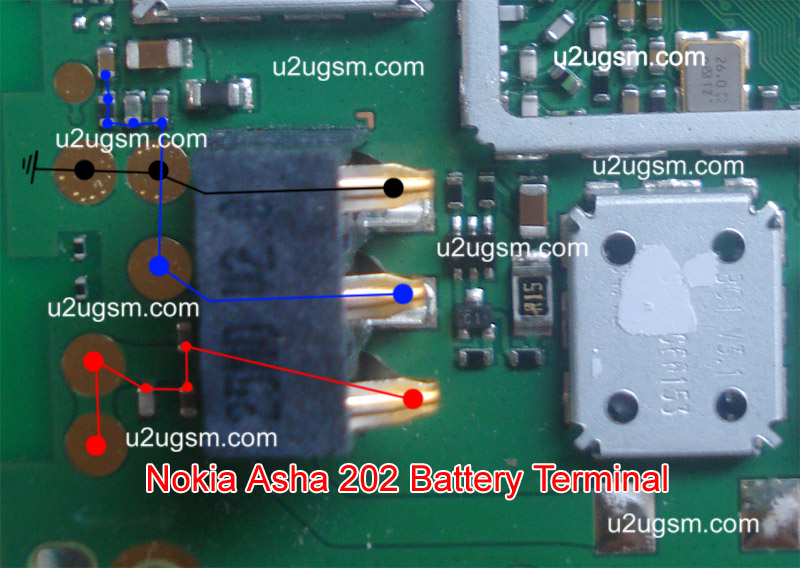
Nokia Asha 202 Battery Terminal Jumper Solution
Nokia asha 202 battery terminals broken or damage solution is possible with this post. If battery terminal jack is damage or prints are broken then you can apply jumpers as given in this post bellow.
Due to Nokia Asha 202 battery terminal damages it can not be power ON. So if nokia asha 202 is dead or no getting power. it may can be due to battery terminal damages.
Nokia C5-03 Not Charging Problem Solution Jumpers

If you find some rust or carbon you can clean it with electronics cleaner. Apply hot air to make it dry.
In above diagram there are different color lines that are used in battery terminal. Check these tracks and parts if any of these links is missing apply jumpers as given in diagram above to repair battery terminals of nokia asha 202.
for more detail and new tips and tricks about cellphone service problem keep visiting this page we will update cellphone service diagrams timely with new cellphone diagrams.some related post are also given bellow you can read them also for more information about cellphone.
Read More..
Due to Nokia Asha 202 battery terminal damages it can not be power ON. So if nokia asha 202 is dead or no getting power. it may can be due to battery terminal damages.
Nokia C5-03 Not Charging Problem Solution Jumpers
If you find some rust or carbon you can clean it with electronics cleaner. Apply hot air to make it dry.
In above diagram there are different color lines that are used in battery terminal. Check these tracks and parts if any of these links is missing apply jumpers as given in diagram above to repair battery terminals of nokia asha 202.
for more detail and new tips and tricks about cellphone service problem keep visiting this page we will update cellphone service diagrams timely with new cellphone diagrams.some related post are also given bellow you can read them also for more information about cellphone.
Tuesday, September 16, 2014

Saturday, September 13, 2014
How to Save Battery Life on Sony Xperia Z
Battery Life depends on how you use your device. For your Sony Xperia Z device, if you want to save your battery to last longer hours, you may need to adjust your settings. Follow these suggestions:
• Turn on the power-saving option on the device. Then lessen the Lcd brightness and the Lcd lock timeout. On the Home Lcd, tap on Menu icon. Select Settings > Power management.
- Use the Stamina mode and Low battery mode features.
- To activate the STAMINA mode: While you are in the Power management, tap on Point icon next to STAMINA mode, then tap Activate.
• Turn down your device volume with the volume keys.
• Close any apps or features when you are done using it so they will not continuously running in the background.
• Turn off the network connection if you are out of range so that your device will stop searching for a network signal. To turn off the network go to Settings and turn off the Bluetooth and Wi-Fi.
• You should use the latest version of the software update. Software updates improves some features and fixes some bugs on the previous software version.
• Adjust your brightness level to low.
• Turn off the camera flash.
• If you have any live wallpaper, Disable it.
• Set the synchronization application to manual. You can also choose the automatic, but increase the synchronization intervals.
• If you want to listen to music, use the Sony original handsfree device. It demand less battery power than your devices own loudspeakers.
Read More..
• Turn on the power-saving option on the device. Then lessen the Lcd brightness and the Lcd lock timeout. On the Home Lcd, tap on Menu icon. Select Settings > Power management.
- Use the Stamina mode and Low battery mode features.
- To activate the STAMINA mode: While you are in the Power management, tap on Point icon next to STAMINA mode, then tap Activate.
• Turn down your device volume with the volume keys.
• Close any apps or features when you are done using it so they will not continuously running in the background.
• Turn off the network connection if you are out of range so that your device will stop searching for a network signal. To turn off the network go to Settings and turn off the Bluetooth and Wi-Fi.
• You should use the latest version of the software update. Software updates improves some features and fixes some bugs on the previous software version.
• Adjust your brightness level to low.
• Turn off the camera flash.
• If you have any live wallpaper, Disable it.
• Set the synchronization application to manual. You can also choose the automatic, but increase the synchronization intervals.
• If you want to listen to music, use the Sony original handsfree device. It demand less battery power than your devices own loudspeakers.
Friday, September 5, 2014
Nokia X2 00 Battery connector Problem New Jumper Solution
Nokia X2-00 Battery connector ways.

Read More..

Sunday, August 31, 2014
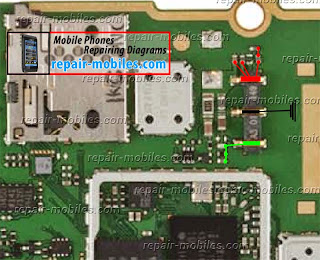
Asha 305 Asha 306 Battery Connector Ways Jumpers
This article is about Nokia Asha 305 and Nokia Asha 306 Battery Connector Ways. The solution available in this post applies to both of these phones. There are some differences in these phones like Asha 305 is a Dual Sim phone where Asha 306 is single but battery connector and parts around it are the same for these two mobile phones.
Nokia Asha 306 Battery Connector is soldered to the motherboard like most of the Nokia phones. If its solder points also called prints are broken whether by removing or any other reason diagram below can help you. I have marked all the battery connector jumper points with different colors. Red(Positive), Black(Negative) and finally Green(BSI).
Please Note that we will edit these solutions or add new ones if found in this page at any time in the future. So feel free to come back any time on this page to stay up to date.
If you have further Questions please dont hesitate to leave a comment.
Note: Every repairing solution posted here is tested by at least one member of our team. Use the information available here at Your Own Risk. We are not responsible if any harm comes to your device during the repairing process.
Tuesday, August 26, 2014
Nokia 6600s Charging Not Store In Battery fix problem
Nokia Mobile 6600s fake charge,charging not save solution.

Read More..

Nokia 2700c charging not Store In Battery Solution
Nokia 2700c charging not save &fake charge solution.

Read More..

Subscribe to:
Posts (Atom)
