Showing posts with label htc. Show all posts
Showing posts with label htc. Show all posts
Wednesday, November 19, 2014
HTC S620 Innovation Not Charging Problem Solution Jumpers

HTC S620 Innovation Not Charging Problem Solution Jumpers
HTC S620 Innovation Charging Solution Jumper Ways
HTC S620 Innovation Charging Problem Repair By jumpers
HTC S620 Innovation Charging Solution Jumper Ways
HTC S620 Innovation Charging Problem Repair By jumpers

Tuesday, November 18, 2014
HTC One X How To Change APN Settings Manually
Some mobile phone providers give customers Internet access point name , or APN Internet , this is a mandate to access the mobile network provider data manually . If you receive an error message after you enter APN Internet , you can not continue to access the data via the cellular network until you resolve the error , though you may be able to use the internet via WiFi for a while .
The majority of mobile operators do not require you to manually enter the APN settings for Internet access cellular data networks , this fact has been done automatically when you subscribe to a cellular data service . One of the reasons you would need access Internet APN manually is if you are traveling abroad and insert a different network SIM card into your phone. Alternatively , the cellular data network you felt slow and you believe that the use of the other will be faster.
APN Network name vs usernameAPN first you need to enter in order to successfully access the cellular data network is the network name , which is usually the name of the carrier . You do not have to get confused between the name of the network with a username , which is the name of the operator who assign specific users to access the network . If you enter the name of the carrier as a username or otherwise , you will not be able to connect .
Internet APN passwordAs well as using services that require authentication , the correct password is necessary to access these services . Since most phones hide the password you enter , try removing and re- enter your password with caution if you are unable to connect to the network , to minimize you make a mistake in entering the password .
WiFiRegardless of why you can not access the Internet via the APN , one way to enjoy Internet access while you know this is a problem connecting to the wireless adapter . The majority of smartphones , such as Android , BlackBerry and iPhone devices , has a WiFi adapter . Connect your phone to a nearby wireless network and start surfing the Internet .
How to Change APN in HTC One XWhen entering the following information do not press Save until told to in the instructions.
1. Tap the Applications key
2. Tap Settings
3. Tap Mobile network
4. Tap Access Point Names
5. Tap the 3 dots on the Top Right of the sceen
6. Tap New APN
7. Tap Name then tap the text box and enter O2 Pay Monthly then tap OK
8. Tap APN then tap the text box and enter wap.o2.co.uk then tap OK
9. Tap Proxy then tap the text box and enter 193.113.200.195 then tap OK
10. Tap Port then tap the text box and enter 8080 then tap OK
11. Tap Username then tap the text box and enter o2wap then tap OK
12. Tap Password then tap the text box and enter password then tap OK
13. Skip past Server as this is preset as Not set
14. Tap MMSC then tap the text box and enter http://mmsc.mms.o2.co.uk:8002 then tap OK
15. Tap MMS proxy then tap the text box and enter 193.113.200.195 then tap OK
16. Tap MMS port then tap the text box and enter 8080 then tap OK
17. Tap MCC then tap the text box and enter 234 then tap OK
18. Tap MNC then tap the text box and enter 10 then tap OK
19. Tap Authentication type and tap PAP
20. Tap APN type and type *
21. Press the 3 Dots on the Top Right of the Lcd
22. Tap Save
23. Tap the circle next to the new profile so a green dot appears in it
24. Press the Back key four times to return to the main menu.
Read More..
The majority of mobile operators do not require you to manually enter the APN settings for Internet access cellular data networks , this fact has been done automatically when you subscribe to a cellular data service . One of the reasons you would need access Internet APN manually is if you are traveling abroad and insert a different network SIM card into your phone. Alternatively , the cellular data network you felt slow and you believe that the use of the other will be faster.
APN Network name vs usernameAPN first you need to enter in order to successfully access the cellular data network is the network name , which is usually the name of the carrier . You do not have to get confused between the name of the network with a username , which is the name of the operator who assign specific users to access the network . If you enter the name of the carrier as a username or otherwise , you will not be able to connect .
Internet APN passwordAs well as using services that require authentication , the correct password is necessary to access these services . Since most phones hide the password you enter , try removing and re- enter your password with caution if you are unable to connect to the network , to minimize you make a mistake in entering the password .
WiFiRegardless of why you can not access the Internet via the APN , one way to enjoy Internet access while you know this is a problem connecting to the wireless adapter . The majority of smartphones , such as Android , BlackBerry and iPhone devices , has a WiFi adapter . Connect your phone to a nearby wireless network and start surfing the Internet .
How to Change APN in HTC One XWhen entering the following information do not press Save until told to in the instructions.
1. Tap the Applications key
2. Tap Settings
3. Tap Mobile network
4. Tap Access Point Names
5. Tap the 3 dots on the Top Right of the sceen
6. Tap New APN
7. Tap Name then tap the text box and enter O2 Pay Monthly then tap OK
8. Tap APN then tap the text box and enter wap.o2.co.uk then tap OK
9. Tap Proxy then tap the text box and enter 193.113.200.195 then tap OK
10. Tap Port then tap the text box and enter 8080 then tap OK
11. Tap Username then tap the text box and enter o2wap then tap OK
12. Tap Password then tap the text box and enter password then tap OK
13. Skip past Server as this is preset as Not set
14. Tap MMSC then tap the text box and enter http://mmsc.mms.o2.co.uk:8002 then tap OK
15. Tap MMS proxy then tap the text box and enter 193.113.200.195 then tap OK
16. Tap MMS port then tap the text box and enter 8080 then tap OK
17. Tap MCC then tap the text box and enter 234 then tap OK
18. Tap MNC then tap the text box and enter 10 then tap OK
19. Tap Authentication type and tap PAP
20. Tap APN type and type *
21. Press the 3 Dots on the Top Right of the Lcd
22. Tap Save
23. Tap the circle next to the new profile so a green dot appears in it
24. Press the Back key four times to return to the main menu.
Monday, November 17, 2014
HTC One X How To Change Alarm Sound
The first thing a person does when having a new phone is changing his ringtone. Depending on what android gadget you have, the sound options for alarm, notification and ringtone will be very different. But if you might not be too happy with the sounds that exist by default on your phone, you can actually replace it with a voice that you have prepared. Its just that some people may not know how to replace it on the android phone.
Before we begin Standart Voice Changing our Android phone, you should choose the first sound of what we will use. Do not forget that the extension is also important to note. Android normally support the extension. Mp3 or. Ogg. So if you choose one of these extensions sound then there will not be a mismatch problem with your phone later.
There are two ways to change the alarm sound on your device: The Personalize utility and the All apps menu.
Personalize:
From the Home Lcd, tap the Personalize tab (paint brush and palate).
Tap Alarm.
Tap the desired notification sound.
Tap Apply.
All apps
From the Home Lcd, tap the All apps icon.
Tap Clock.
Tap the Alarms icon at the bottom of your Lcd.
Tap the desired alarm.
Tap Alarm sound.
Tap the desired notification sound.
Tap Apply.
Tap Done.
Thus you have successfully Changing the Sound Standard your Android phone with the sound that you want. Hopefully a little above tips can be useful for you Android lovers
Read More..
Before we begin Standart Voice Changing our Android phone, you should choose the first sound of what we will use. Do not forget that the extension is also important to note. Android normally support the extension. Mp3 or. Ogg. So if you choose one of these extensions sound then there will not be a mismatch problem with your phone later.
There are two ways to change the alarm sound on your device: The Personalize utility and the All apps menu.
Personalize:
From the Home Lcd, tap the Personalize tab (paint brush and palate).
Tap Alarm.
Tap the desired notification sound.
Tap Apply.
All apps
From the Home Lcd, tap the All apps icon.
Tap Clock.
Tap the Alarms icon at the bottom of your Lcd.
Tap the desired alarm.
Tap Alarm sound.
Tap the desired notification sound.
Tap Apply.
Tap Done.
Thus you have successfully Changing the Sound Standard your Android phone with the sound that you want. Hopefully a little above tips can be useful for you Android lovers
Wednesday, September 24, 2014


Tuesday, September 23, 2014
How to Unlock HTC One M8 Bootloader All Variants
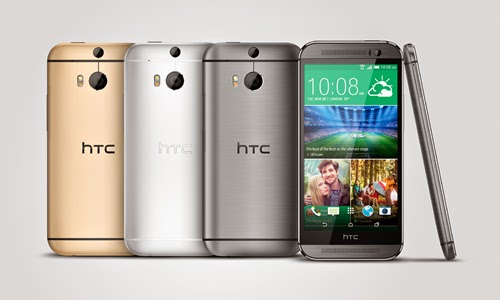
Already a proud owner of HTC One (M8) Android smartphone? Then you can now root the device / unlock the boot loader. The best part is that the method which we will be discussing is valid for all the HTC One M8 variants. So after checking out the list of quick pre requisites, we will be checking out in detail on what are the instructions with which you can unlock the boot loader.
Quick Pre Requisites:
Quick Pre Requisites:
- All the data in your device needs to be backed up with the help of below mentioned steps manually and not with HTC Sync.
SMS – Use “SMS Backup & Restore app”,
Contacts – Sync with the Gmail application,
Call Log - Call Log and Restore
Images, Songs, Videos, Files – Copy to internal / External SD Card,
APN and MMS Settings – Note down from the path “Applications > Settings > Wireless and Network > Mobile Networks > Access Point Names”
- Head over to the path “Settings > Applications > Development > USB debugging” in your HTC One M8 so as to enable the USB Debugging Mode. Make sure that you have installed the Android ADB in your computer.
Disclaimer: We should not be held responsible in any manner for any damage happened to your HTC One M8 due to not following the instructions mentioned in the article.
Once you have backed up all the data in your device, you now will have to proceed to the next step where we have mentioned the detailed guide which will help you update the device.
Procedure to Unlock the Boot loader in HTC One M8 Android Phone:
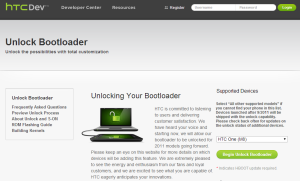
- Head over to the HTC Dev website and Open the Boot loader Unlock Page.
- Up next, you need to Select HTC One (M8) in the Supported Devices drop-down menu and click on Begin Unlock Boot loader. Agree to all the terms and conditions to proceed further.
- Now, turn off your HTC One M8 Android phone so that it can be entered in the boot loader mode. Boot loader mode in HTC One M8 can be entered by pressing the Volume down and power keys. Use the volume keys to highlight on the “fastboot” and select the same with the help of the Power button.
- Once your device enters in the fastboot mode, you now need to connect your M8 to the computer with the help of original USB cable.
- Open the command prompt in your computer to enter the below mentioned command to find out on whether the device is successfully connected to the computer or not.
Fastboot devices
- Once the above command is entered, you will see that the device serial number is displayed after which you need to enter the below mentioned command;
Fastboot oem get_identifier_token
- Right click inside the CMD window and click on Mark. Select everything from <<<
>>> to <<< >>>. Right click again to copy the text. Once you see the token, you then will have to proceed to the HTC Dev Website to locate the My Device Identifier token box. - Paste the token and click on Submit. After few minutes, HTC will send you the unlock code to your email address. Just open your email and download the attached Unlock_code.bin file in your computer.
- Open the file of Unlock_code.bin and and press SHIFT key and right click on the empty space inside the folder where the Unlock code is present. After this, you need to select the Open command prompt here and enter the below mentioned command in your device;
fastboot flash unlocktoken Unclock_code.binNow, your device will ask you to confirm which can be done with the help of on Lcd instructions.Note: If at all your HTC One M8 smartphone gets in the boot loop mode, then you need to turn off the device and then reapply the update from the start. To turn off you long press the power button and repeat the whole process again.
Do let us know in the comments section just in case if you face any issues in the process of boot loader unlock.
Monday, September 22, 2014
How to HTC ROM Update Utility RUU variant explanation
HTC device owners might be a little confused as to understand the current numbering method used to mark the HTC software update them. Here you can find a brief explanation of this.
we all know that HTC sells their devices throughout the world. Each operator and regions in the world have some "local settings" or less different. By "local arrangements" mean such things as: the emergency call number, language, time zone settings, network settings, the operator brand, GPS settings and much more. Therefore each of the software for the same device to be even different.
Every HTC update has the following numbering structure:

a.bb.ccc.d
a - the first number of the software. Normally it doesnt increase very often, but when it does, it usually means newer Android version.
bb - this number is also a software number. Increasing bb number means some more or less major update based on the same Android version, but sometimes it might even bring newer version of the HTC Sense.
ccc (also cc or cccc) - this is the number of the region/carrier. It has nothing to do with the software itself being newer or older. More details below.
d (sometimes dd) - the third part of the software version (the fourth one in the RUU name). Usually indicates some minor update with some hot fixes.
Example: 3.20.401.3
So basically, when you are interested in the software version, you should look at a.bb.d (3.20.ccc.3) because ccc (401) means only the region/carrier variant of the software.
Here is the list I was able to gather of possible RUU variants:
a.bb.61.d - Orange UK (United Kingdom)
a.bb.65.d - Orange CH (Switzerland)
a.bb.69.d - Orange PL (Poland)
a.bb.73.d - Orange FR (France)
a.bb.75.d - Orange ES (Spain)
a.bb.110.d - T-Mobile UK (United Kingdom)
a.bb.111.d - T-Mobile DE (Germany)
a.bb.112.d - T-Mobile AT (Austria)
a.bb.113.d - T-Mobile CZ (Czech Republic)
a.bb.118.d - T-Mobile PL (Poland)
a.bb.161.d - Vodafone UK (United Kingdom)
a.bb.163.d - Vodafone FR (France)
a.bb.165.d - Vodafone IT (Italy)
a.bb.166.d - Vodafone CH-DE (Switzerland - Germany)
a.bb.168.d - Vodafone GR (Greece)
a.bb.169.d - Vodafone AT (Austria)
a.bb.206.d - O2 UK (United Kingdom)
a.bb.207.d - O2 DE (Germany)
a.bb.401.d - World Wide English (WWE)
a.bb.415.d - Arabic (UAE/Middle East)
a.bb.468.d - Turkey
a.bb.497.d - Morocco
a.bb.498.d - WWE Brightpoint US (United States)
a.bb.502.d - Cingular US (United States)
a.bb.531.d - T-Mobile US (United States)
a.bb.631.d - Rogers Canada (WWE)
a.bb.651.d - Sprint US (United States)
a.bb.661.d - Telus WWE (Canada)
a.bb.666.d - Bell Canada
a.bb.707.d - Asia (WWE)
a.bb.708.d - Asia HK (Hong Kong)
a.bb.709.d - Asia TW (Taiwan)
a.bb.720.d - Asia (India)
a.bb.728.d - Virgin AU (Australia)
a.bb.751.d - Chunghwa Telecom (Taiwan)
a.bb.771.d - Hutchison 3G UK (United Kingdom)
a.bb.777.d - ?
a.bb.841.d - Telsra WWE (World Wide English)
a.bb.862.d - Voda-Hutch AU (Australia)
a.bb.901.d - TIM IT (Italy)
a.bb.911.d - SK Telecom (South Korea)
a.bb.980.d - Optus AU (Australia)
a.bb.999.d - HTC Test RUU
a.bb.1400.d - China
a.bb.1401.d - ?
a.bb.1403.d - HTC China CMCC (China Mobile Communications Corporation)
a.bb.1540.d - HTC One U.S. Developer Edition
a.bb.1600.d - ?
a.bb.1700.d - HTC One Google Edition
The list is quite long, and Im sure there are still some some missing. If you know more variants, please let me know in the comments section.
The 401 and the 707 devices are usually the first ones that HTC prepare updates for. Carrier branded software is usually months after the WWE updates.
Finally, keep in mind that each software version is connected with the CID (Carrier ID) and MID (Model ID) of your device. That means you cant use whichever version you want, unless you have S-OFF on your device. Each ROM Update Utility.exe package will check your device details (bootloader version, MID and CID) before starting the update process.
a.bb.61.d - Orange UK (United Kingdom)
a.bb.65.d - Orange CH (Switzerland)
a.bb.69.d - Orange PL (Poland)
a.bb.73.d - Orange FR (France)
a.bb.75.d - Orange ES (Spain)
a.bb.110.d - T-Mobile UK (United Kingdom)
a.bb.111.d - T-Mobile DE (Germany)
a.bb.112.d - T-Mobile AT (Austria)
a.bb.113.d - T-Mobile CZ (Czech Republic)
a.bb.118.d - T-Mobile PL (Poland)
a.bb.161.d - Vodafone UK (United Kingdom)
a.bb.163.d - Vodafone FR (France)
a.bb.165.d - Vodafone IT (Italy)
a.bb.166.d - Vodafone CH-DE (Switzerland - Germany)
a.bb.168.d - Vodafone GR (Greece)
a.bb.169.d - Vodafone AT (Austria)
a.bb.206.d - O2 UK (United Kingdom)
a.bb.207.d - O2 DE (Germany)
a.bb.401.d - World Wide English (WWE)
a.bb.415.d - Arabic (UAE/Middle East)
a.bb.468.d - Turkey
a.bb.497.d - Morocco
a.bb.498.d - WWE Brightpoint US (United States)
a.bb.502.d - Cingular US (United States)
a.bb.531.d - T-Mobile US (United States)
a.bb.631.d - Rogers Canada (WWE)
a.bb.651.d - Sprint US (United States)
a.bb.661.d - Telus WWE (Canada)
a.bb.666.d - Bell Canada
a.bb.707.d - Asia (WWE)
a.bb.708.d - Asia HK (Hong Kong)
a.bb.709.d - Asia TW (Taiwan)
a.bb.720.d - Asia (India)
a.bb.728.d - Virgin AU (Australia)
a.bb.751.d - Chunghwa Telecom (Taiwan)
a.bb.771.d - Hutchison 3G UK (United Kingdom)
a.bb.777.d - ?
a.bb.841.d - Telsra WWE (World Wide English)
a.bb.862.d - Voda-Hutch AU (Australia)
a.bb.901.d - TIM IT (Italy)
a.bb.911.d - SK Telecom (South Korea)
a.bb.980.d - Optus AU (Australia)
a.bb.999.d - HTC Test RUU
a.bb.1400.d - China
a.bb.1401.d - ?
a.bb.1403.d - HTC China CMCC (China Mobile Communications Corporation)
a.bb.1540.d - HTC One U.S. Developer Edition
a.bb.1600.d - ?
a.bb.1700.d - HTC One Google Edition
The list is quite long, and Im sure there are still some some missing. If you know more variants, please let me know in the comments section.
The 401 and the 707 devices are usually the first ones that HTC prepare updates for. Carrier branded software is usually months after the WWE updates.
Finally, keep in mind that each software version is connected with the CID (Carrier ID) and MID (Model ID) of your device. That means you cant use whichever version you want, unless you have S-OFF on your device. Each ROM Update Utility.exe package will check your device details (bootloader version, MID and CID) before starting the update process.
Tuesday, September 16, 2014
HTC One M8 User Guide
HTC One M8 Troubleshooting - Are you HTC One M8 owners? in this site we provide about informations about HTC One M8 troubleshooting, in the HTC One Troubleshooting contents is a how to transfer data from SIM card to phone,How to reset password, how to transfer items using to media card
 And this site we provide free download HTC One M8 user manual,
Troubleshooting tips of HTC One M8 at a Glance
Transfer data from an iPhoneor Android device
1. You must be connected to a Wi-Fi network on both your old device and on your HTC device.
2. On your HTC device, visit www.HTC.com/deviceswitchapp and download the device switch app.
3. Open the device switch app.
4. Complete the instructions on the Lcd.
How to reset if you losing or forgotten your ID password?
Do one of the following:
1. To reset your password on a computer, visit www.htc.com. Click Reset your password. Complete the instructions on the Lcd.
2. To reset your password on your htc device, when you are prompted to sign in with your HTC, click Forgot Password. Answer your security question and complete the instructions on the Lcd.
If you can’t transfer items using your media card?
Try any of the following:
1. Back up items from your media card to another source, such as your htc device built-in media storage or your desktop computer. Format your media card or purchase a new media card. Save the items that you backed up to the media card and then try transferring the items again.
2. Use HTC Link to transfer your info from one device to another. To download HTC Link, on your computer, visit www.com. select the Windowsor Macoption.
Why some of the data from my previous device isn’t on my new device?
Try any of the following:
1. Check that your personal email accounts have been set up. Email accounts aren’t transferred and need to be set up in theHTC Hubon the device.
2. Check that your work email accounts have been set up. For a Microsoft ActiveSyncemail account on a HTC Enterprise Server, contact your administrator for the information required to activate the account.
3. Look for memos and tasks in the HTC Remember app.
4. Transfer apps by downloading them from the HTC World Storefront.
Free download HTC One M8 user manual 4.16MB
Read More..

Troubleshooting tips of HTC One M8 at a Glance
Transfer data from an iPhoneor Android device
1. You must be connected to a Wi-Fi network on both your old device and on your HTC device.
2. On your HTC device, visit www.HTC.com/deviceswitchapp and download the device switch app.
3. Open the device switch app.
4. Complete the instructions on the Lcd.
How to reset if you losing or forgotten your ID password?
Do one of the following:
1. To reset your password on a computer, visit www.htc.com. Click Reset your password. Complete the instructions on the Lcd.
2. To reset your password on your htc device, when you are prompted to sign in with your HTC, click Forgot Password. Answer your security question and complete the instructions on the Lcd.
If you can’t transfer items using your media card?
Try any of the following:
1. Back up items from your media card to another source, such as your htc device built-in media storage or your desktop computer. Format your media card or purchase a new media card. Save the items that you backed up to the media card and then try transferring the items again.
2. Use HTC Link to transfer your info from one device to another. To download HTC Link, on your computer, visit www.com. select the Windowsor Macoption.
Why some of the data from my previous device isn’t on my new device?
Try any of the following:
1. Check that your personal email accounts have been set up. Email accounts aren’t transferred and need to be set up in theHTC Hubon the device.
2. Check that your work email accounts have been set up. For a Microsoft ActiveSyncemail account on a HTC Enterprise Server, contact your administrator for the information required to activate the account.
3. Look for memos and tasks in the HTC Remember app.
4. Transfer apps by downloading them from the HTC World Storefront.
Free download HTC One M8 user manual 4.16MB
Friday, September 5, 2014
Reset HTC HD7 to Restore Default Factory Settings
Reset HTC HD7 to Restore Default Factory Settings - HTC HD7 is a full touchscreen phone with an oversized 4.3” LCD electrical phenomenon touchscreen (480 x 800 pixels resolution) that includes Corning great ape Glass protection, measuring system and Proximity sensing element.The phone runs on Microsoft Windows Phone 7 OS with the support of 1 rate Scorpion central processor, Adreno 200 GPU, Qualcomm QSD8250 flower chipset, 512 MB memory board and 576 MB RAM. It offers 8GB (Europe) / 16GB (Asia) of internal storage, while not memory card slot to expand the capability. The property options comprise of Wi-Fi 802.11 b/g/n; Bluetooth v2.1 with A2DP; and microUSB v2.0. For the camera, its five MP camera with optical device, dual-LED flash, Geo-tagging, and recording capability.

Reset HTC HD7 to Restore Default Factory Settings
Hard Reset HTC HD7
Factory Reset HTC HD7
Factory Reset HTC HD7
You can reset your HTC HD7 to restore the default factory settings by following below instructions:
- On the Start screen, tap
- Tap Settings > about phone.
- Tap reset your phone, and then tap yes.
OR
- With the phone turned off, press and hold the VOLUME UP and DOWN buttons, and then briefly press the POWER button.
- Wait for the screen to show the instructions on how to do the factory reset, and then release the VOLUME UP and DOWN buttons.
- Follow the instructions onscreen to factory reset your phone
Subscribe to:
Posts (Atom)
