Showing posts with label sim. Show all posts
Showing posts with label sim. Show all posts
Thursday, December 18, 2014


Sunday, December 7, 2014
Symphony China Mobile Sim Solution Jumper Ways


Wednesday, November 19, 2014
Lg Kg270 insert Sim problem solution ways track

Lg Kg270 insert Sim problem solution ways track

Tuesday, November 18, 2014
Nokia 1800 insert sim or sim not work solution tips

Wednesday, September 24, 2014
Nokia 105 sim problem solution
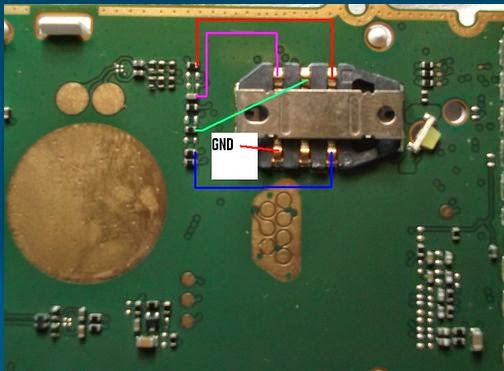
This is solution of nokia 105 insert sim problem solution.this is very easy solution.If you face this problem then first check your phone other good sim card if problem still then repair your problems following below picture.
Tuesday, September 23, 2014
Samsung S7330 Sim Ways Jumper fix problem

Saturday, September 20, 2014

Thursday, September 18, 2014
Samsung I5500 Galaxy 5 Sim Ways Jumper fix problem

Tuesday, September 16, 2014
Nokia asha 311 insert sim problem jumper solution
This is nokia asha 311 sim jumper solution.This phones sim part is different of other nokia phone .This phone sim part create without sim ic.Now I showing how to repair it.
How to do this : If your phone has this problem then first check sim point if you found no response any point then jumper that point using this picture.
Sunday, September 14, 2014
Nokia x2 02 sim track ok sim ic ok but insert Sim Problem fix problem
Nokia Mobile x2-02 insert sim card ways jumper ways solution,sim ways damage,sim ways track missing,sim ways line broken,sim ways print missing jumper solution 100% Tested.
![Nokia]()
Friday, September 12, 2014

Wednesday, September 3, 2014

Monday, September 1, 2014
Nokia 2710 Insert Sim fix problem

now i share this how to working fine
Nokia Mobile 2710 Insert Sim How to Fix problem,
Nokia Mobile 2710 Insert Sim Ways How to Fix problem,
Nokia Mobile 2710 Insert Sim ways damage How to Fix problem,
Nokia Mobile 2710 Insert Sim print damage How to Fix problem,
Nokia Mobile 2710 Insert Sim jumper How to Fix problem,
Nokia Mobile 2710 Insert Sim line missing How to Fix problem,
Nokia Mobile 2710 Insert Sim Diagram,
can i help you to solved your problem ?
Please Write Me Only One Comment:) Dont waste your time to writing comment ok no problem now give me only 5 Seconds to Share My Post
Saturday, August 30, 2014

Tuesday, August 26, 2014
How to Transfer Contacts from Sim Card or Memory Card to Sony Xperia Z1 Compact
How to transfer contacts from a SIM card to your device:
1. On your devices homescreen, tap on the .
.
2. Then tap on the Person icon or Contacts.
3. Press the Three Vertical Dots, and select Import contacts > SIM card.
4. If you have set up a synchronization account, then you can choose to add the SIM card contacts under that account. Or you may choose to only use the contacts on your device.
5. If you want to import all the contacts, tap Import all.
6. If you want to select which contact to transfer, you just need to find and tap on the contact.
How to transfer contacts from a memory card to your device:
1. On your devices homescreen, tap on the.
2. Then tap on the Person icon or Contacts.
3. Press the Three Vertical Dots, and select Import contacts > SD card.
4. Choose the option you preferred if you have set up a synchronization account. Whether to add the imported contacts under that account or on your device.
5. If you have more than one vCard file on the SD card, there should be a list appear on the different batches of contacts. Just select the batch you want to import.
Read More..
1. On your devices homescreen, tap on the
.2. Then tap on the Person icon or Contacts.
3. Press the Three Vertical Dots, and select Import contacts > SIM card.
4. If you have set up a synchronization account, then you can choose to add the SIM card contacts under that account. Or you may choose to only use the contacts on your device.
5. If you want to import all the contacts, tap Import all.
6. If you want to select which contact to transfer, you just need to find and tap on the contact.
How to transfer contacts from a memory card to your device:
1. On your devices homescreen, tap on the
.2. Then tap on the Person icon or Contacts.
3. Press the Three Vertical Dots, and select Import contacts > SD card.
4. Choose the option you preferred if you have set up a synchronization account. Whether to add the imported contacts under that account or on your device.
5. If you have more than one vCard file on the SD card, there should be a list appear on the different batches of contacts. Just select the batch you want to import.
Monday, August 25, 2014
Nokia C3 00 Sim Ic Jumper Solution 100 Tested
Nokia C3-00 Insert sim solution.insert sim Card Problem Solution ,Sim Ways Line Jumper Solution100% Tested.

Read More..

Subscribe to:
Posts (Atom)
