Showing posts with label phone. Show all posts
Showing posts with label phone. Show all posts
Tuesday, January 6, 2015
Sam E2222 phone Lock done
UNIT: Samsung DUOS E2222

DIAGNOSTIC: Phone lock code..
TOOLS:
DIAGNOSTIC: Phone lock code..
TOOLS:
- HWK
- C3303k cable(rj45)
- Open SAMs GUI
- Tick connect
- Select Swift TAB
- Select Model(E2222)
- connect cable(phone must be in TAT MODE)
- Then tick "Mobile Info"
- wait till finish
- click unlock
- wait until finish
- put sim card and power on

Monday, November 24, 2014

Friday, October 24, 2014
Blackberry 9550 cellular phone usb ways repair solution
blackberry 9550 cellular phone usb not connect repair solution, blackberry 9550 cellular phone usb not charging phone repair solution,blackberry 9550 cellular phone usb ways repair jumper 100% tested solution ,blackberry 9550 cellular phone usb not show charging solution,blackberry 9550 cellular phone usb not connect repair solution if u have blackberry 9550 not show charging for connect charger i have good solution for charging blackberry if u need this solution see my diagram and try step to step i think done your phone 100% working changing and connect usb for your computer see this solution
blackberry 9300 Cellular Phone No Display Light Repair Solution.
see this diagram

see this way 100% tested way many time tested me this solution if u need this i give my all friend see and enjoy it your blackberry 9550 usb ways and charging line guide solution and dont forget visit my blog.
I Phone 4S Display light Not working repair solution
I Phone 4S Display light Not working repair solution ,if u have i phone 4s and this phone problem display light not working display not show light no problem i have this problem 100% working solution this solution working many phone ,i phone 4s display light ic damage not working light solution see this solution
I Phone 4s camera solution 100% tested solution here

this solution working solution ,i phone 4s display light solution without ic working only jumper 1 line 100% working solution this solution 1st try to manual 2nd try my jumper i hope solved your phone light problem solution.
Thursday, October 23, 2014
Blackberry 9320 Cellular phone USB Charger ways Repair Solution
blackberry 9320 cellular phone usb & charger ways repair solution,blackberry 9320 cellular phone usb & charging ways not working repair solution,blackberry 9320 cellular phone usb & charger ways repair guide solution,blackberry 9320 cellular phone usb not recognize repair solution,blackberry 9320 cellular phone usb line damage solution,blackberry 9320 cellular phone charging line damage ways repair solution,blackberry 9320 cellular phone usb repair tips and tricks solution,blackberry 9320 cellular phone usb & charger ways jumper repair solution,blackberry 9320 cellular phone without ic usb & charger ways repair solution ,blackberry 9320 cellular phone charger not working solution,blackberry 9320 cellular phone charging solution,blackberry 9320 cellular phone charging not save solution,blackberry 9320 cellular phone charging jumper solution,blackberry 9320 cellular phone charging solution without ic many time phone set ok but not charge phone and no have charge i have this problem 100% ways jumper done your phone see my solution i hope done your phone.
Blackberry 9000 cellular mobile repair usb ways solution

see this solution 100% tested line here i hope done your phone dont forget visit my blog.
I Phone 5 Handsfree Problem Not Working Solution
I phone 5 hands free problem not working solution,if u have i phone 5 and u have this phone problem of hands free i have this problem 100% repair solution this solution working many time see this solution this solution working for i phone 5 hands free see this diagram and working step by step 100% working i think u understant ,i phone 5 hands free line damage repair solution,hands free tips and tricks see this solution
I Phone 5 Full Ways Details See this 100% Working Way

i phone 5 hands free problem 100% working solution try this solution many time tested me this solution this solution working i phone 5 without ic working hands free repair solution i hope solved your problem.
Friday, September 26, 2014
Download Install Micromax Blow Air to Unlock Shake Unlock App for Any Android Phone
Micromax India yesterday launched a new Smart Phone called as the Canvas 4 which came up with some interesting features which we had listed yesterday in our blog post. One of those feature was the lock Lcd application which allows you to Unlock your Phone by just blowing air onto the Lcd or by just shaking the device.

Just download the APK file from the link given below and then proceed to the installation of this app. Ensure that you have enabled the option to “Allow installation of apps from sources other than the play store” from the Security section of your Phone. Once the app is installed, you would be asked to tap once on the same to Enable it following which you would get the lock Lcd active on your phone.
Download App Directly [From your Smart Phone]
Overall this a interesting application and a useful feature if you are bored with your current locking options. Check out the video above for a small demo of the same to know if this is useful for you or not. Thanks to Keanu for extracting this app from the Canvas 4 ROM.
Wednesday, September 24, 2014
Get Your Smart Phone Apps and Solve Instant Problem
Get Your Smart Phone Apps and Solve Instant Problem : There are many kinds of Smart Phone and iPhone in the world. Many kinds of apps also available in Smart Phone and iPhone. Smart Phone or iPhone is always compatible with full multimedia, music, games and high speed communication. To establish a secure communication some apps are available in iPhone and Smart Phone world. The popularity of mobile apps has continued to rise, as their usage has become increasingly prevalent across mobile phone users at home and abroad. Most of the apps are created by Android.
Necessary Apps list are given below :
Necessary Apps list are given below :
BD Data Plan : This apps will help you to know all mobile operator Internet package.
Internet Speed Meter : This apps will help you to know everyday usage of internet browsing.
Any Share : This apps will help you to share anything from one mobile to another with high speed.
BMI Calculator : This apps will help you to know about height and weight of your body smoothly.
GPH Speed o Meter : This apps will you to specify the speed of your vehicle.
MAP My Work : This apps will help you to create map with your movement.
TubeMat : This apps will help you to download video from YouTube easily.
Talking Tom: This apps will help you to create a little bit fun with a talking Cat.
Skype : This apps will help you to make conversation with video conference.
Mobile Care : This apps will help you to to recover virus problem and other problem.
DU Speed Booster : This apps will help you to speed up mobile performance.
Expense Manager : This apps will help you make total account of everyday expenditure.
You Can Download These Apps from the following store :
Internet Speed Meter : This apps will help you to know everyday usage of internet browsing.
Any Share : This apps will help you to share anything from one mobile to another with high speed.
BMI Calculator : This apps will help you to know about height and weight of your body smoothly.
GPH Speed o Meter : This apps will you to specify the speed of your vehicle.
MAP My Work : This apps will help you to create map with your movement.
TubeMat : This apps will help you to download video from YouTube easily.
Talking Tom: This apps will help you to create a little bit fun with a talking Cat.
Skype : This apps will help you to make conversation with video conference.
Mobile Care : This apps will help you to to recover virus problem and other problem.
DU Speed Booster : This apps will help you to speed up mobile performance.
Expense Manager : This apps will help you make total account of everyday expenditure.
You Can Download These Apps from the following store :
- Amazon App store
- BlackBerry World
- Google Play
- Nokia Store
- Windows Phone Store
- Windows Store
- App Store
- Samsung Apps Store
More Apps are available with iPhone, Smart Phone, Android Phone.
Saturday, September 20, 2014
Samsung M8800 Cellular Phone Charging Ways fix problem

Thursday, September 18, 2014
Samsung S3350 Ch t 335 Cellular Phone Keypad light No Working Solution

Thursday, September 11, 2014
Samsung S3350 Ch t 335 Cellular Phone Mic Not Working Ways Jumper Solution

Monday, September 8, 2014
How to Check If Your Phone is Infected by Malware or Virus
Malware or Viruses may be harmful to your phone specially to its performance. So how can you detect if your phone is affected by a Virus or Malware? Several signs will affect your phone performance:
>> Longer to load than usual.
>> Use up data at a faster rate.
>> Battery seem to be running down much faster.
>> Calls being dropped or interrupted with weird noises.
If you believe you have a Virus or Malware on your Android phone, then you need to take immediate action to remove it. There are two ways on how to resolve this problem.
Reminder: The most common way Android phones become affected is from downloading malicious apps. Be careful on what in downloading.
Read More..
>> Longer to load than usual.
>> Use up data at a faster rate.
>> Battery seem to be running down much faster.
>> Calls being dropped or interrupted with weird noises.
These are some symptoms that your phone is affected by a Malware or Virus. How to remove these viruses on your android device.
If you believe you have a Virus or Malware on your Android phone, then you need to take immediate action to remove it. There are two ways on how to resolve this problem.
Reminder: The most common way Android phones become affected is from downloading malicious apps. Be careful on what in downloading.
Solution 1: Install an Anti-virus
- Avast! Mobile Security
- Lookout Mobile Security
- AVG Mobilation
- Dr.Web for Android
- MalwareBytes Anti Malware
Install one of these anti-virus and anti-malware software and do the scan on your phone device.
Solution 2: Do the Factory Reset or Hard Reset.
Find your device on this site and check how to factory reset or hard reset. If your device is not listed then do contact us on the form.
Friday, September 5, 2014
What is Rooting and Benefits of Rooting Your Android Phone Guide
Confuse with whether to root your android phone or not? Lets have a look on what is rooting and benefits of rooting android phone. Rooting is a very common term amongst android users. After having an Android Smartphone or Tablet, most of us search Internet for a rooting guide for the device. However, in this article we are not going to give you any rooting guide to root your android phone, instead you’ll get a clear idea about rooting android phone, Advantages and disadvantages of rooting android devices, so that you can decide yourself whether to root your android phone or not.
![What]()
So, what is rooting? Rooting is basically a way to get admin right or full control over phone’s operating system. Manufacturers are used to inactive some of the advance system features by default to prevent average users from causing damage to mobile operating system. Android is most customizable mobile operating system ever but most of the advance features stay inactive by default. Rooting helps to remove all those limitations and give you the full power to control or customize advance settings, features, and performance of your phone.
Also Read: Data Backup Guide for Android Users
*** Runs various Apps which ask root permission: One of the great advantage of having an android powered phone is that, you can download and install tons of free apps from the Google Play Store which give your android experience a different level. However most of the great apps in Google Play Store works with rooted android phone. There are plenty of normal apps available which works with non rooted android phone but root apps allow more features and control to access system settings and tweak various features. So, if you have a rooted android phone, you can enjoy lots of great apps from Google Play Store.
Also Read: Download Latest Gapps for Android Phone
*** Flash Various Custom ROMs: One of the most important advantage of rooting android phone is that, you can enjoy various custom ROMs on a rooted android phone. If you don’t know, Custom ROMs are made from the source of official firmware by third party developer which provide many customizable features, increase overall processor speed, change the overall look of your android phone and many more. With a rooted android phone you can enjoy various custom ROMs like- CyanogenMod, ParanoidAndroid, AOKP, PACman, SLIM ROMs, MIUI and much more.
*** Free up lots of System Memory: One of the major complain of android users that internal memory is full of defaults apps and very low space for installing new apps. Its true that most android phone comes with huge system apps by default which takes a big amount of internal memory. But with a rooted android phone, you can transfer apps to External SD Card or install apps to SD card. Hence you can free up lots of internal memory space.
*** Rooting void manufacturer warranty: The main disadvantage of rooting android phone is that root void the phone’s manufacturer warranty. Means, once you rooted your phone, your phone’s manufacturer will not give you warranty even if your phone is in warranty period. The service centers will charge for any service they provide for the phone. But this is not a serious issue as you can un-root your device any time and get back your manufacturer warranty by re-installing the official firmware.
Also Read: Download USB Driver for Your Android Phone
*** Rooting might brick your phone: First up all you should know that rooting your phone is a very serious task and should be done carefully. You’ll find a number of rooting software and tools that help rooting process very easy even for normal user but ones should take help from advance android users who have already done the rooting process. Follow every step carefully while rooting your phone else you might end with Bricking your phone. Taking any wrong step or flashing corrupted root file may cause your phone brick, means your phone will be dead.
Hope you now understand what is rooting and disadvantages and benefits of rooting android phone. Rooting voids manufacturer warranty, rooting might brick your phone but if you can take the risk then you can experience all those great apps, custom ROMs and much more. Its now on you, whether you want to root your phone or not. If you want to know anything else related to rooting android phone, then feel free to contact with us using the comment form below.
Read More..
So, what is rooting? Rooting is basically a way to get admin right or full control over phone’s operating system. Manufacturers are used to inactive some of the advance system features by default to prevent average users from causing damage to mobile operating system. Android is most customizable mobile operating system ever but most of the advance features stay inactive by default. Rooting helps to remove all those limitations and give you the full power to control or customize advance settings, features, and performance of your phone.
Also Read: Data Backup Guide for Android Users
Benefits of rooting android phone
After rooting your android phone, you can do a number of advance tasks with your android phone. Find below some of the most important task you can do with your rooted android phone. advantages or benefits of rooted android phone includes:*** Runs various Apps which ask root permission: One of the great advantage of having an android powered phone is that, you can download and install tons of free apps from the Google Play Store which give your android experience a different level. However most of the great apps in Google Play Store works with rooted android phone. There are plenty of normal apps available which works with non rooted android phone but root apps allow more features and control to access system settings and tweak various features. So, if you have a rooted android phone, you can enjoy lots of great apps from Google Play Store.
Also Read: Download Latest Gapps for Android Phone
*** Flash Various Custom ROMs: One of the most important advantage of rooting android phone is that, you can enjoy various custom ROMs on a rooted android phone. If you don’t know, Custom ROMs are made from the source of official firmware by third party developer which provide many customizable features, increase overall processor speed, change the overall look of your android phone and many more. With a rooted android phone you can enjoy various custom ROMs like- CyanogenMod, ParanoidAndroid, AOKP, PACman, SLIM ROMs, MIUI and much more.
*** Free up lots of System Memory: One of the major complain of android users that internal memory is full of defaults apps and very low space for installing new apps. Its true that most android phone comes with huge system apps by default which takes a big amount of internal memory. But with a rooted android phone, you can transfer apps to External SD Card or install apps to SD card. Hence you can free up lots of internal memory space.
Disadvantages of rooting android phone
Yes, along with many benefits, rooted android phone have disadvantages too. Check out below to find disadvantages of rooting android phone.*** Rooting void manufacturer warranty: The main disadvantage of rooting android phone is that root void the phone’s manufacturer warranty. Means, once you rooted your phone, your phone’s manufacturer will not give you warranty even if your phone is in warranty period. The service centers will charge for any service they provide for the phone. But this is not a serious issue as you can un-root your device any time and get back your manufacturer warranty by re-installing the official firmware.
Also Read: Download USB Driver for Your Android Phone
*** Rooting might brick your phone: First up all you should know that rooting your phone is a very serious task and should be done carefully. You’ll find a number of rooting software and tools that help rooting process very easy even for normal user but ones should take help from advance android users who have already done the rooting process. Follow every step carefully while rooting your phone else you might end with Bricking your phone. Taking any wrong step or flashing corrupted root file may cause your phone brick, means your phone will be dead.
Hope you now understand what is rooting and disadvantages and benefits of rooting android phone. Rooting voids manufacturer warranty, rooting might brick your phone but if you can take the risk then you can experience all those great apps, custom ROMs and much more. Its now on you, whether you want to root your phone or not. If you want to know anything else related to rooting android phone, then feel free to contact with us using the comment form below.
Thursday, September 4, 2014
Blackberry 9105 cellular phone trackpad ways solution
blackberry 9105 trackpad ways solution ,blackberry 9105 trackpad ways repair solution,blackberry 9105 trackpad ways not working solution,blackberry 9105 trackpad ways repair guide solution ,blackberry 9105 trackpad ways jumper solution,blackberry 9105 trackpad ways jumper tricks solution,blackberry 9105 trackpad ways tricks guide solution if u have blackberry 9105 trackpad problem phone many time water damage phone show this problem set on but not working trackpad see my way i hope solved your problem
1st check change trackpad i think done your phone but not done see all line i think done but not done see my last step i hope now done i show my solution see and try step by step 100% working many time this solution see my solution all blackberry solution have this bogger so see and enjoy our solution .

see this solution and jumper stepby step 100% working this and dont forget visit my blogger.
Friday, August 29, 2014
China Phone Repair Solution Pack
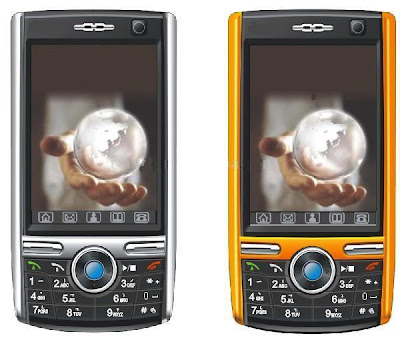
if you check it much give few comments about this so that others can learn form your comments also.
If you have any other Questions please do not hesitate to share with me.
Thursday, August 28, 2014
How to remove screen lock or pattern lock and hard reset android phone
Every android phone has screen lock or pattern lock some time may be block this lock.when block screen lock or pattern lock then need to remove this lock.Now I showing tricks of how to remove screen lock, pattern lock, or hard reset.There are have some method for remove screen lock and hard reset.Now I discuss about those method.
![remove]()
Method number 2 #

Method number 1 #
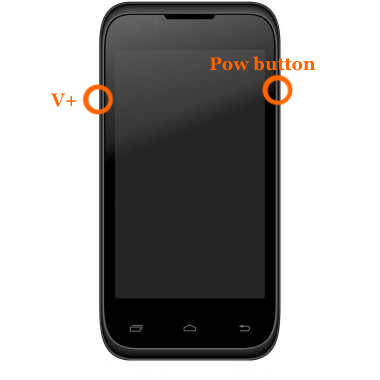
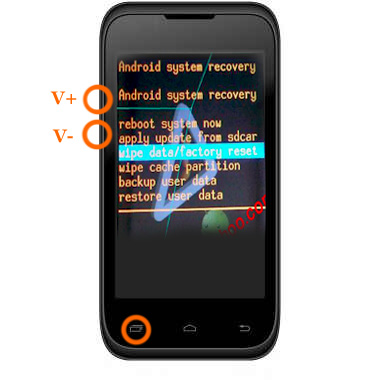
press and hold "V+ and power button" together some second.After some second you will see factory mood on your phone screen as like as step-2 picture next select wipe data / factory reset using v+ or v- button and press ok button.Your phone will be restart.
Step-2
Method number 2 #
- At first Switch off your phone.
- Press and hold volume up + call button and + power button, while still holding before showing android logo then wait some time.After that
- If you see recovery menu / factory menu then go to step 5
- If you dont see recovery menu / factory menu then press home button or left key or call button then you will see.When you see recovery menu / factory menu then go to step 5
- Select Wipe data/Factory and press ok button
- Then select delete all data and press ok button then your phone will be restart and take several minute.
Method number 3 #
When the phone is powered off, press and hold the Volume Up button and the Volume Down button keys both at the same time, then press and hold the Power key until a test screen that shows some available options appears, usually takes about 15-20 seconds. When that screen pops up you can let go of the keys.
Press the Volume Down key to navigate down through the options until it highlights FACTORY RESET then press thePower key to select it.
Method number 4 #
Power the phone off all the way, press and hold the Volume Down button and press than release the Power button, still holding the volume down button for about 10-15 seconds. When you see some additional options pop up on the screen you can let go of the keys.
Press the Volume Down button select the options until it highlights the reset option; it usually says FACTORY RESET, then press the Power key to make the selection.
Method number 5 #
Method number 6 #


Method number 7#
Method number 8 #
Method number 9 #
I hope Work one method of the all above method.apply all method one by one.
Subscribe to:
Posts (Atom)
