Showing posts with label remove. Show all posts
Showing posts with label remove. Show all posts
Monday, November 17, 2014
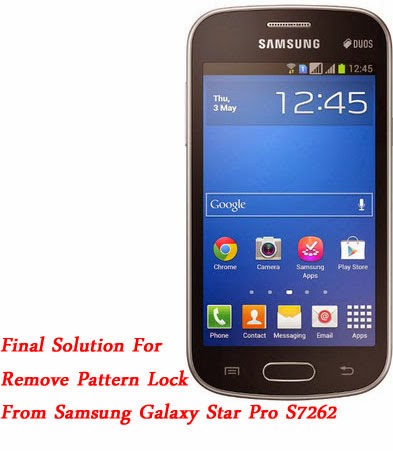
Remove Pattern Lock From Samsung Galaxy Star Pro 100 Working Solution
How To Remove Pattern Lock From Samsung S7262 100% Working Solution
Here The Solution For Remove Pattern Lock From Samsung Galaxy Star Pro . It Was Simple And Tested 100% Working Way Try this Way And Comment Your Result
- Tools And Files:
- Odin3
- S7262 Csc File
- s7262 Pattern Lock Remove Steps
- Put Your Phone To Download Mode By Step :- Switch Off Your Phone . Press And Hold Volume Down + Home Key And Power On Your Phone . Now You See a Warning . Press Volume Up To Continue.
- Open Odin3.exe
- Connect Your Phone To Pc Using Data Cable
- Now You See A Id In Id:Com Section
- Click On Csc Tab In Odin And Select Downloaded Csc.tar.Zip
- Now Click Start And Wait Some Seconds
- After Completing Process Your Phone Will Reboot In To Recovery Select Wipe / Data Reset
- Done !
- Tools And Files:
- Odin3
- S7262 Csc File
- s7262 Pattern Lock Remove Steps
- Put Your Phone To Download Mode By Step :- Switch Off Your Phone . Press And Hold Volume Down + Home Key And Power On Your Phone . Now You See a Warning . Press Volume Up To Continue.
- Open Odin3.exe
- Connect Your Phone To Pc Using Data Cable
- Now You See A Id In Id:Com Section
- Click On Csc Tab In Odin And Select Downloaded Csc.tar.Zip
- Now Click Start And Wait Some Seconds
- After Completing Process Your Phone Will Reboot In To Recovery Select Wipe / Data Reset
- Done !

Friday, September 19, 2014
How to Add and Remove an Account on Nexus 4

To add an account
1. On your devices Lcd, go to Settings.
2. Then go to Accounts and select Add account.
3. And tap on the kind of account you wish to add on your device. Just follow the on-Lcd instructions to complete. Most accounts require a username and password depending on the kind of account and the configuration of the service youre connecting to.
4. You may also be asked to configure what kinds of data you want to sync, name the account and other pertinent details.
5. Once youre done adding an account you can view them on:
> For Google Accounts you can view them under Settings > Accounts > Google.
> For all other accounts you can view them under Settings > Accounts.
To remove an account
1. To remove a Google account on your Nexus 4 touch its name under Settings > Accounts or Settings > Accounts > Google, then Menu > finally tap on Remove account.
2. To remove other accounts on your Nexus 4 go to Settings > Accounts > account-name and look for Remove option.
Thursday, August 28, 2014
How to remove screen lock or pattern lock and hard reset android phone
Every android phone has screen lock or pattern lock some time may be block this lock.when block screen lock or pattern lock then need to remove this lock.Now I showing tricks of how to remove screen lock, pattern lock, or hard reset.There are have some method for remove screen lock and hard reset.Now I discuss about those method.
![remove]()
Method number 2 #

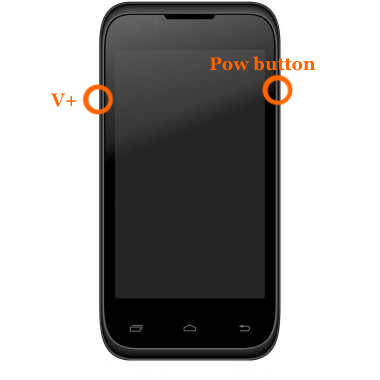
Method number 1 #
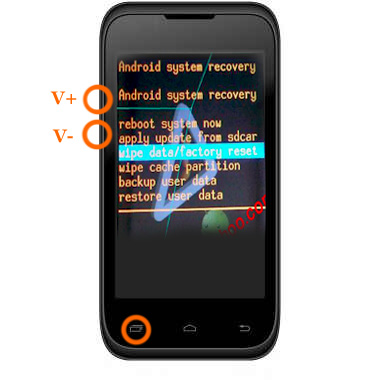
press and hold "V+ and power button" together some second.After some second you will see factory mood on your phone screen as like as step-2 picture next select wipe data / factory reset using v+ or v- button and press ok button.Your phone will be restart.
Step-2
Method number 2 #
- At first Switch off your phone.
- Press and hold volume up + call button and + power button, while still holding before showing android logo then wait some time.After that
- If you see recovery menu / factory menu then go to step 5
- If you dont see recovery menu / factory menu then press home button or left key or call button then you will see.When you see recovery menu / factory menu then go to step 5
- Select Wipe data/Factory and press ok button
- Then select delete all data and press ok button then your phone will be restart and take several minute.
Method number 3 #
When the phone is powered off, press and hold the Volume Up button and the Volume Down button keys both at the same time, then press and hold the Power key until a test screen that shows some available options appears, usually takes about 15-20 seconds. When that screen pops up you can let go of the keys.
Press the Volume Down key to navigate down through the options until it highlights FACTORY RESET then press thePower key to select it.
Method number 4 #
Power the phone off all the way, press and hold the Volume Down button and press than release the Power button, still holding the volume down button for about 10-15 seconds. When you see some additional options pop up on the screen you can let go of the keys.
Press the Volume Down button select the options until it highlights the reset option; it usually says FACTORY RESET, then press the Power key to make the selection.
Method number 5 #
Method number 6 #


Method number 7#
Method number 8 #
Method number 9 #
I hope Work one method of the all above method.apply all method one by one.
Subscribe to:
Posts (Atom)
